
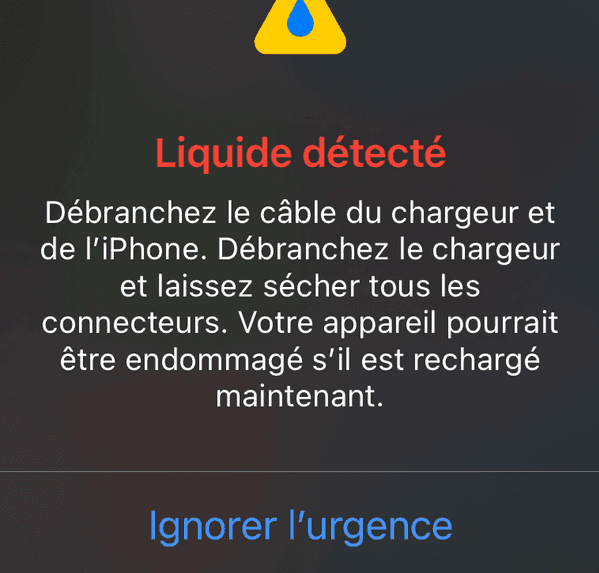
What to do if you see a liquid warning?
It's a classic situation that can quickly trigger panic when you're down to 10% battery: the famous iOS error message indicating liquid in the charging port (whether Lightning or USB-C).
If charging abruptly stopped and a warning pops up on your screen, don't panic! The MediaStreet team has put together this comprehensive guide to help you take the right steps, avoid fatal mistakes, and know when to reach out to us.
conseil
1. First reflexes (test these in 2 minutes)
Before trying drastic measures, check these quick points:
- Try another cable / charger: The issue often comes from moisture on the cable plug itself.
- Restart your smartphone: If the port is dry, a simple reboot often clears a stuck false alert.
- NEVER force charging: Overriding the alert risks causing short circuits on the motherboard.
2. The rice myth and what to ABSOLUTELY avoid
At MediaStreet, we see dozens of phones damaged by this famous myth: "Put it in a bowl of rice overnight!" This is a terrible idea.
Rice is not an effective dehumidifier for electronics. Even worse, starch dust and small grains of rice get inside ports and risk permanently blocking the connector or speakers.
Common mistakes to eliminate immediately
Never attempt these methods as they will worsen internal damage:
- ✓No cotton swabs or paper towels: You risk leaving fibers on the metal pins.
- ✓No compressed air: The pressure will push moisture deeper inside the frame.
- ✓No hairdryers (hot air): Excessive heat can degrade internal components and seals.
3. How to dry your device properly?
1. Clean the cable: Carefully wipe the connector with a soft, dry cloth.
2. Let physics do the work: Gently tap your phone against your palm (port facing down) to dislodge trapped droplets.
3. Be patient in a ventilated area: Place your device flat in a dry, well-ventilated room. Wait at least 30 minutes to a few hours.
> 💡 Emergency backup solution: If your battery is dead and you urgently need your phone, use wireless charging (Qi / MagSafe). This system is completely independent of the physical port and is 100% safe.
What if the port is dry? Watch out for dirt and bugs!
The alert triggers when an electrical resistance anomaly is detected between pins. Pocket lint packed at the bottom of the port can absorb ambient moisture and create a false contact. Turn off the phone and gently clean the bottom of the port using a wooden or plastic toothpick (never metal!).
What if the alert persists after drying?
Condensation may have caused oxidation or damaged the internal charging module. Stop by our MediaStreet workshop: our technicians will inspect the connector under a microscope and replace it with a certified part without needing a full phone replacement.
MediaStreet Workshop
Is your phone still refusing to charge?
Entrust your device to our experts for a quick microscopic diagnosis and a safe repair of your charging port.
Visit workshop / Request a quote